 United States
 Canada
Government contracts worth your time.
We match public notices to your company and prepare the bids you pursue.
Captivaq, from the first match to a bid ready to submit
Sound familiar?
This month, youmissed a contract.
And your last search ran nine days ago. It is not your fault. Notices land every day across the US and Canada, and nobody can read them all and still do the work they already won.
“We opened SAM.gov every morning and most days it was twenty minutes for nothing.”
 Dana WhitfieldOwner, Ridgeline Facility Services
“We found the one that fit us two days before it closed. There was no time left to write anything good.”
 Tom BeauchampPrincipal, Beauchamp Mechanical
“Half of what we read was never going to be ours. Wrong size, wrong state, wrong set-aside.”
 Priya RamanCapture lead, Anchorstone Group
“Nobody wanted to own the search, so it just did not happen.”
 Jean CormierPresident, Cormier Electrique
Everything before the decision. Handled.
Captivaq watches SAM.gov and CanadaBuys, reads the package, and drafts the bid. You come in at the decisions.
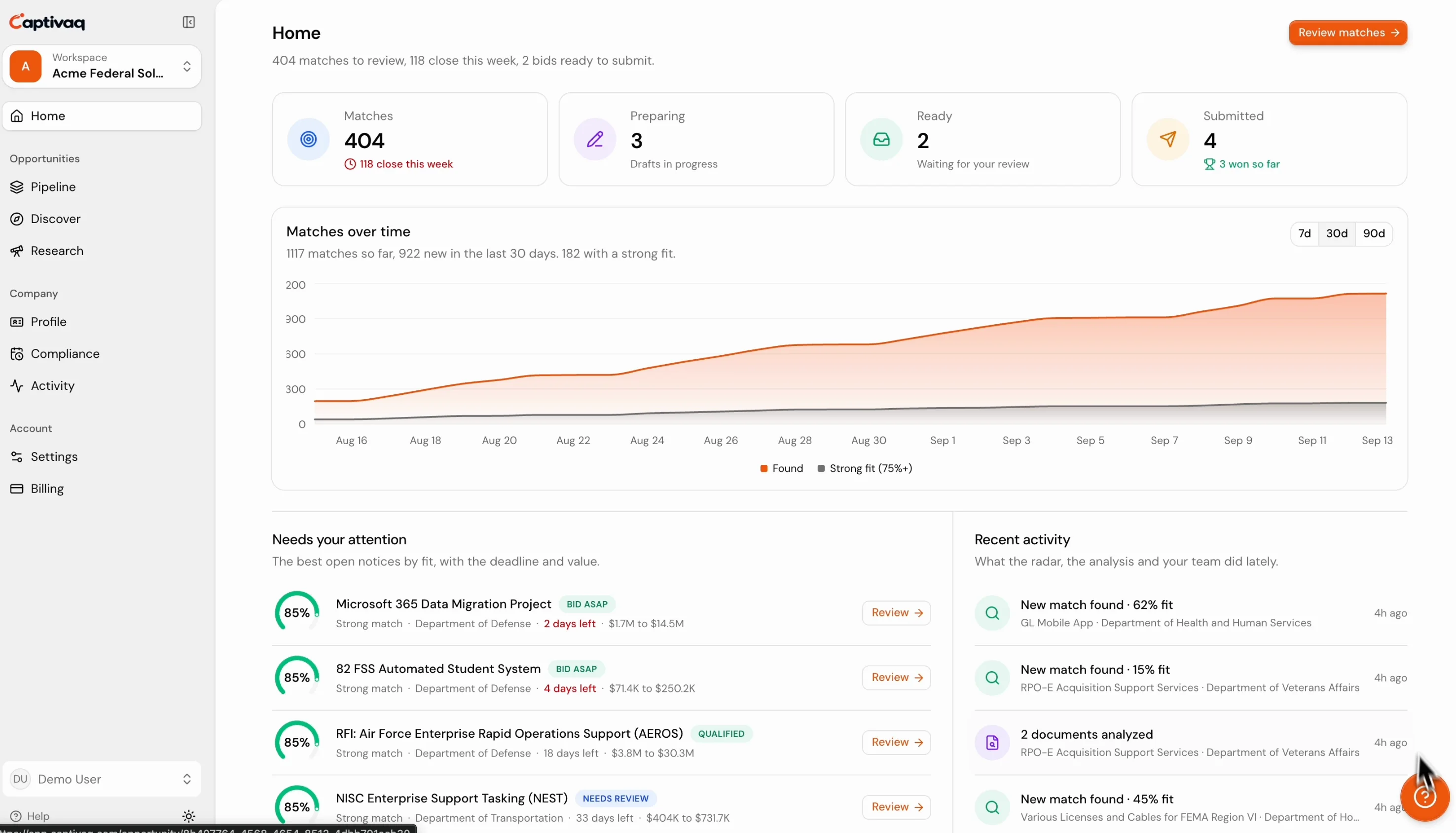
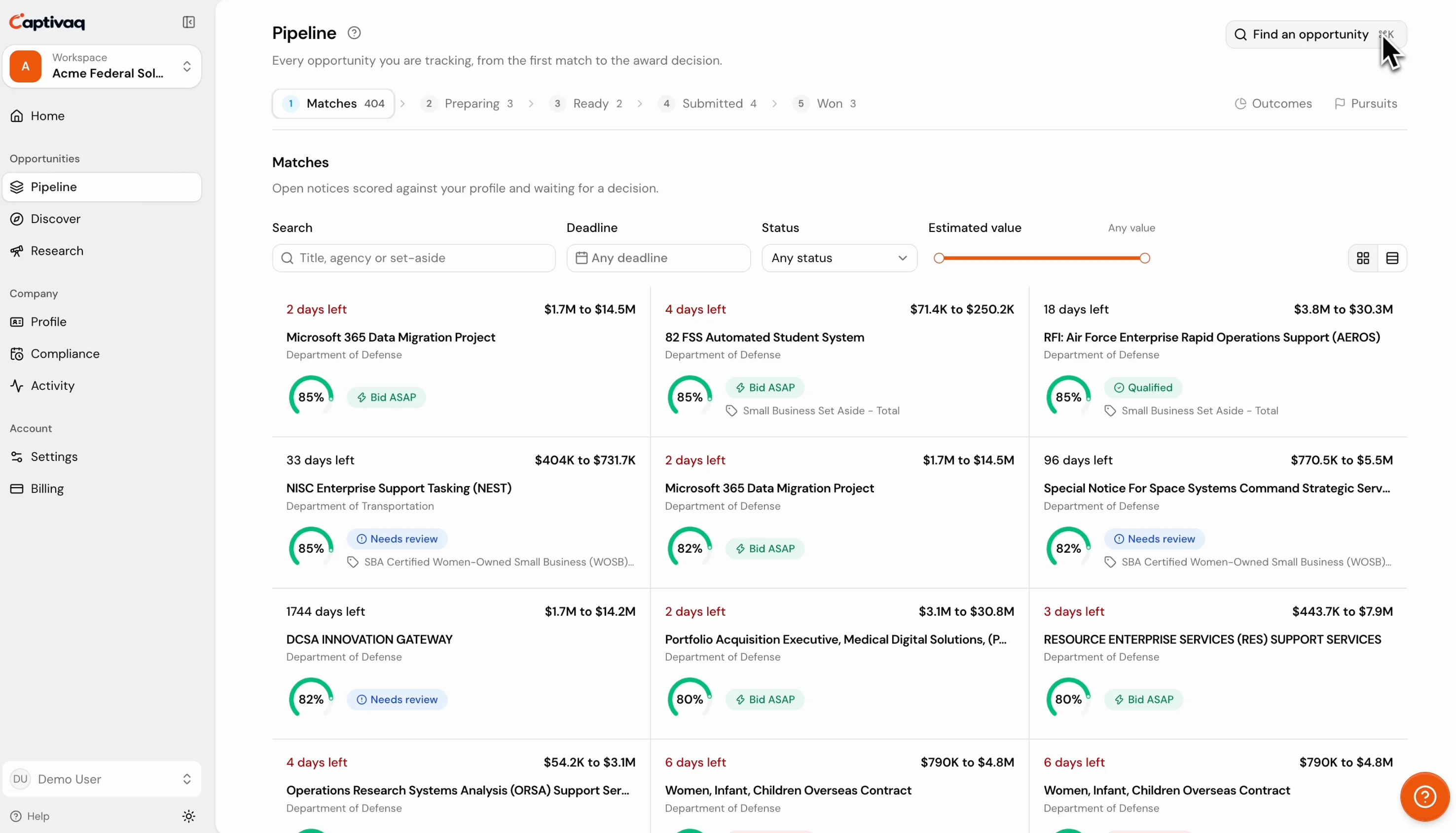
Example match: Janitorial services, Cabo Rojo National Wildlife Refuge, U.S. Fish and Wildlife Service, fit 78%. NAICS 561720 is on your profile. Small business set-aside, you qualify.
Scored against your profile.
Notices from SAM.gov, CanadaBuys and the state portals, narrowed to the ones you can win, each with the reason it matched.
Example key dates for a network refresh at Aberdeen Proving Ground, each read out of the solicitation and assigned to a team member: Questions due, Nov 10, Section L 3.2; Amendment 0002, Today, acknowledge on SF 30; Site visit, Building 6000, Nov 14, Section L 5.1; Proposal due, 4:00 pm ET, Dec 2, Section L 1.4.
Every date, pulled and owned.
The question deadline, site visit and each amendment are read out of the package and handed to someone on your team, with the file it came from.
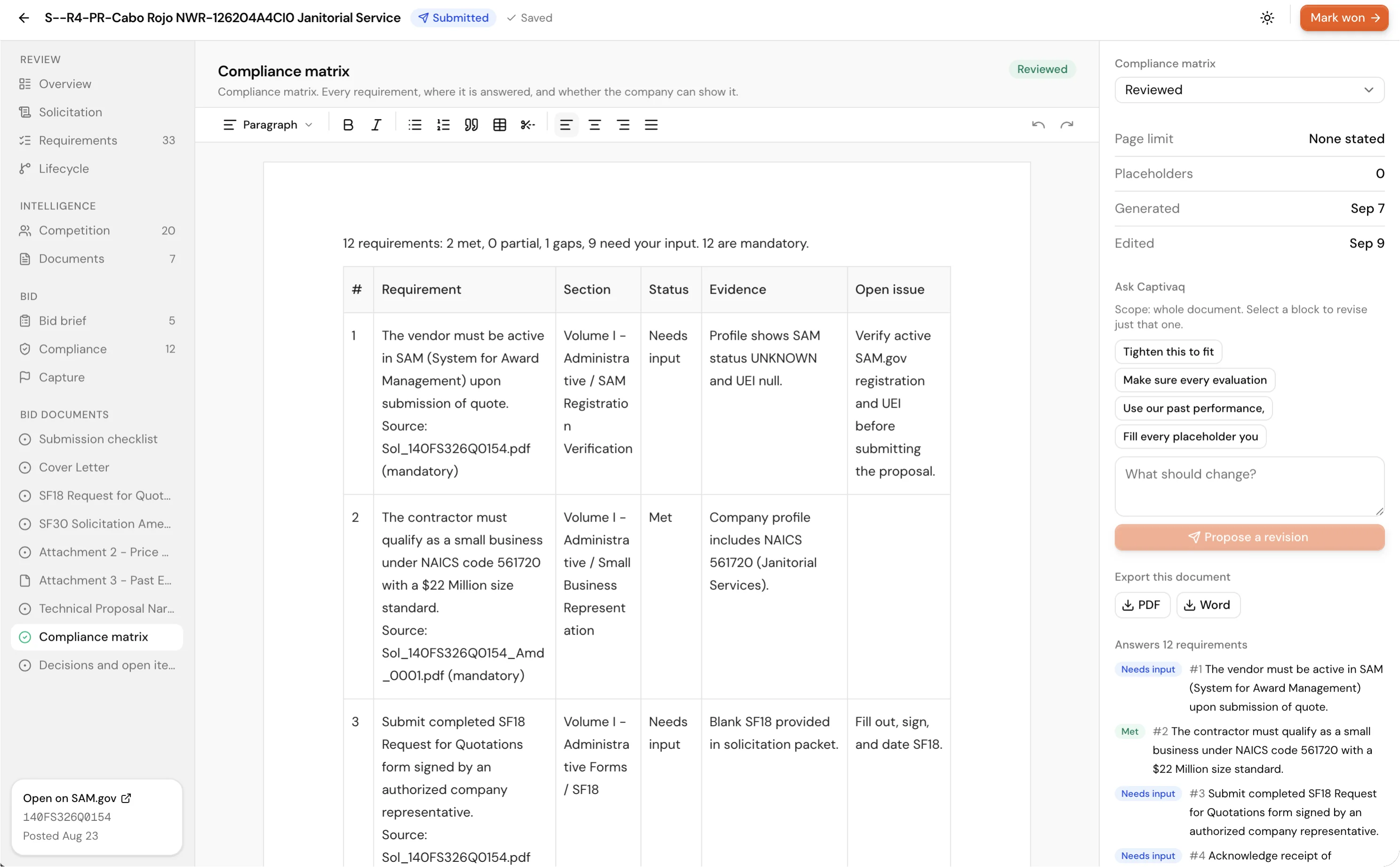
Example drafted bid section for snow and ice removal at Canadian Forces Base Kingston. Technical volume, 2.1 Approach to snow clearing: We will stage two plow units and one salt spreader at CFB Kingston from November 15, with a bilingual site supervisor on call as Section 6.2 requires. One decision left for you: pricing basis, per event or per season.
Bids drafted before you ask.
The technical volume and compliance matrix fill in from your profile and past awards. What is left is a short list of decisions.
Start with the company you have.
A notice arrives, and Captivaq turns it into a company fit assessment, a list of requirements and a package you can review. US and Canada, in one workspace.
Start with the work you do.
Browse open opportunities by industry, with links to the official notices.
Ten minutes to set up. Then it runs.
- “We already get SAM.gov alerts.”
- Alerts send everything. We send what fits.
- “We have no past performance.”
- Plenty of work asks for none.
- “We are two people.”
- One shortlist a day. Drafts written for you.
Reads from
- SAM.gov
- CanadaBuys
- SEAO
- Alberta
- Virginia
- Texas
- New York
- Delaware
- USAspending
“First tool that told us why a notice fit before we opened it.”
 Susan HarlanOwner, Harlan Sitework
“Set up in an afternoon. First draft that week.”
 Daniel ReyesPrincipal, Reyes Facility Group
Customer stories
Contractors report saving a day a week on the search.
Teams that used to check five portals now read one shortlist, and Captivaq keeps every match current.
“If you spend your mornings on SAM.gov, you are going to like Captivaq.”
 Ben CarlisleOwner, Carlisle Site Services
“We found a set-aside we never would have searched for, and we won it.”
 Karen MitchellPresident, Mitchell Janitorial Group
“We stopped reading notices and started answering them.”
They had two people scanning SAM.gov and CanadaBuys every morning. On Captivaq instead: one shortlist a day, and their first bid drafted in an afternoon.
 Nadia OkaforOperations Director, Kestrel Mechanical
“I do in ten minutes what used to take a morning. I think it easily saves me a day a week. We bid more and chase less.”
 Sam WhitakerOwner, Whitaker Paving
“I used to search once a month and miss half of what fit. Now the matches come to me every day and I only open the ones that score.”
 Luc LachancePresident, Lachance Construction
“Seeing why a notice fits us before we open it. That alone has been huge. Our no-bid decisions take minutes instead of a meeting.”
 Diego AlvarezCapture Manager, Blueline Environmental
The things people ask before they start.
Something we missed? Write to us, a human answers.
01Does Captivaq submit bids for me?
No. It prepares the bid and stops. Submission, signatures and anything legally binding stay with you.
02How is this different from a SAM.gov alert?
Captivaq assesses notices against your company profile, identifies strengths and gaps, and prepares the bid documents for opportunities you choose to pursue.
03We have no government past performance. Is this for us?
Yes. Start as a subcontractor. Captivaq shows which primes in your field hire subs, from US federal subcontract records, and flags notices you are better off joining under a prime. Sub work you log becomes past performance for your own bids.
04What notices does it monitor?
Captivaq reads SAM.gov and CanadaBuys notices, plus selected state and provincial portals. These include sources sought, presolicitations, solicitations, amendments and awards.
05Do I need to be registered in SAM.gov?
No. Matching starts without it. If you have a UEI, Captivaq pulls your SAM entity record so your codes, business size and set-aside eligibility are right from the start. Canadian companies skip the step and start on CanadaBuys.
06How does it know what my company can do?
Setup reads your website and drafts a profile you correct: what you do, your capabilities, your industries and your NAICS and PSC codes. You add certifications, registrations, past performance, people and the states or provinces you work in. Every notice is scored against that profile.
07How often does it look for new contracts?
Daily. Each source is swept on its own schedule, which is as often as those sources publish, new notices are read and scored as they arrive, and award history and agency data refresh overnight.
08Will it email me about every notice?
No. One alert the first time a match scores 75 or higher, and a Monday summary of your best open matches. Separately, a reminder when a registration, certification, contract vehicle or clearance is about to expire. Each person turns any of them off in settings.
09Can I edit and export the bid?
Yes. Edit the documents in your workspace, then export an individual document or the full package to PDF or Word. Your team approves pricing and submits.
10What if the draft is missing information?
It says so. Facts Captivaq does not have are left as bracketed placeholders, the compliance matrix marks every requirement met, partial or a gap, and the decisions only a person can make are listed on their own.
11Can my team work on the same bids?
Yes. Invite people by email and everyone shares one company profile, the same matches and the same pipeline. Your plan sets how many seats you get.
12Can I use it from Claude or Cursor?
Yes. Create an MCP key in settings and any MCP client can read your profile, pipeline, matches, opportunity intelligence and upcoming recompetes. The connection is read only.
13Is there a free trial?
Scout comes with 3 free days. Add a card at checkout, and cancel before the trial ends to pay nothing. Pro and Team bill from day one. Every plan can be cancelled anytime from billing.
Set up your company once. It keeps looking after that.
Tell us what you do, where you work, and what you have won. We match every new US and Canadian notice against that, score the fit, and draft the bids you decide to go after.
- US and Canada in one search
- You review and submit every bid
- Two months free on annual billing
- Cancel anytime